ComfyUI & Ollama power.
Zero terminal friction.
Logen is a native desktop studio for Windows and Linux x64 that runs FLUX.1-schnell, Stable Diffusion, and upscaling pipelines directly on your GPU—complete with project-linked AI chat threads, a 2-column workflow studio, and a 1:1 pixel lightbox.
 1:1 Full-Res Lightbox Ready



Four integrated workspaces. Built to keep you in creative flow.
Switch between natural-language project chat, granular parameter tuning, project-organized gallery inspection, and hardware-aware model management inside one cohesive desktop window.
Every conversation is a persistent creative project.
Click + New Chat at any time to start a fresh visual brief without losing earlier work. Each thread automatically names and tags every generated image with its project_id and project_name.
- Auto-expanding multi-line composer: Paste complex prompts (
Shift+Enterfor new lines) and pick aspect ratios (1:1,16:9,9:16) inline. - Zero lost prompts on error: If a generation is interrupted or VRAM is busy, Logen preserves your exact prompt text in the composer for instant retry.
- Rename & switch threads live: Renaming a chat thread automatically updates its folder name across your entire Gallery.
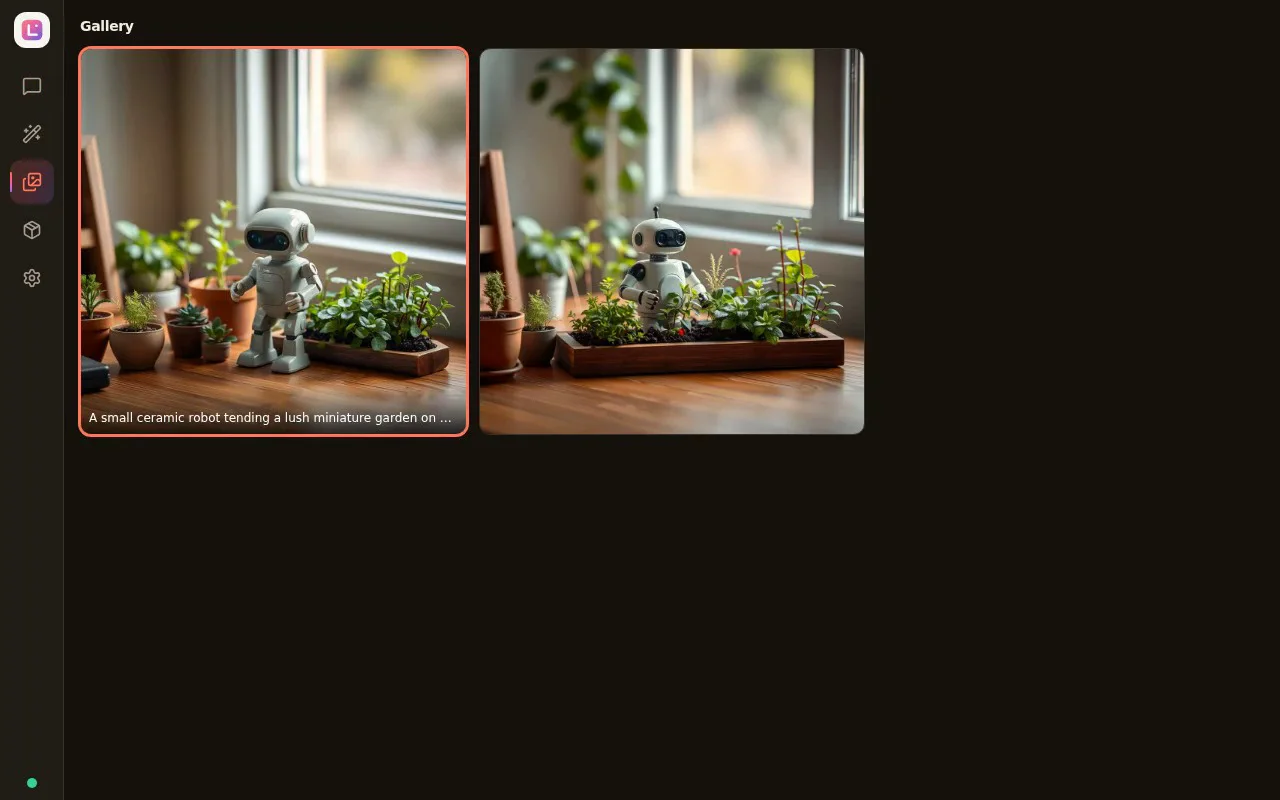
“A small ceramic robot tending a lush miniature garden on a sunlit oak desk, macro lens, warm morning window light.”
Direct parameter control without node-graph clutter.
When you want deterministic control over a render, switch to the Workflow Studio. Human-readable parameter controls sit on the left while a sticky live preview canvas stays locked on the right.
- Bundled production workflows: Text-to-Image (
flux_schnell_txt2img,sd35_txt2img), Image-to-Image (sd15_img2img), and 4x RealESRGAN upscaling. - Inline parameter presets: Dial in Steps, CFG guidance, Sampler, Scheduler, Seed, and dimensions—then save reusable presets for your team or client style.
- Custom ComfyUI JSON & Batch Queue: Import compatible ComfyUI API workflows or run multi-seed variations in Batch mode.
Source Render
Edited Output
Organized by project folder. Inspectable down to the pixel.
Stop hunting through numbered output filenames. Logen’s Gallery groups every generation under its project cover card with instant prompt search and a full-screen darkroom lightbox.
- True 1:1 Full Resolution toggle: Inspect fine detail and upscaled edges at 100%–400% zoom or toggle Fit-to-Screen.
- Keyboard-driven review: Use
←and→arrow keys to step rapidly through a project’s variations andEscto return. - One-click roundtrip: Copy the image to clipboard, Save As, reveal the file on disk, copy the prompt, or click Open Project Chat to resume iterating.
Self-healing local services & VRAM-verified downloads.
Logen eliminates the #1 pain point of local AI: broken background servers. If Ollama is asleep when you send a chat message, Logen spawns it silently in the background. If a model is missing or VRAM overflows, actionable recovery buttons fix it in place.
- Actionable error taxonomy: Structured recovery for
ollama_offline,ollama_model_missing,comfyui_offline, andvram_oom. - Hardware-aware Model Manager: Displays live GPU VRAM fit badges (
Fits your GPU) alongside model license terms before you download. - Seamless desktop auto-updates: Built-in updater delivers new releases directly from
titanxt.io/downloads/.
Smart Setup & Self-Healing Engine
Detects your GPU and VRAM, installs ComfyUI and FLUX.1-schnell on first launch, auto-starts Ollama when needed, and delivers background app updates automatically.
Project-Linked AI Chat
Start a new project thread at any time, paste multi-line prompts, pick aspect ratios, and switch or rename project threads without losing earlier conversations.
Hardware-Aware Model Manager
Start with FLUX.1-schnell and SD 1.5. Browse eligible optional models including FLUX.2 [klein] and Z-Image-Turbo with GPU VRAM fit badges; each model has its own license and hardware requirements.
Project Gallery & 1:1 Lightbox
Every generated image is organized under its chat project with full metadata. Click any image to inspect at 1:1 full pixel resolution, navigate with arrow keys, or jump back to its chat thread.
Two-Column Workflow Studio
Fine-tune steps, CFG guidance, sampler, scheduler, seed, and resolution alongside a sticky live preview canvas, and save reusable parameter presets inline.
ComfyUI Workflows & Batching
Run bundled text-to-image, image-to-image, and upscaling workflows, import compatible ComfyUI workflow JSON, or generate multi-seed variations in Batch mode.
Check what your GPU runs—and what you save vs. cloud plans.
Select your graphics card’s video memory (VRAM) below to see how Logen configures models for your tier.
Start free forever. Upgrade once for £49 when you need batch & 4K.
No monthly retainers, no expiring credits, and a 30-day no-questions-asked money-back guarantee on Logen Pro.
Logen Free
Complete local AI image generation with our self-healing ComfyUI & Ollama runtime.
- ✓ Local AI generation on your own GPU
- ✓ FLUX.1-schnell default + SD 1.5 workflows
- ✓ Project-linked multi-thread AI Chat
- ✓ Project Gallery & 1:1 full-resolution Lightbox
- ✓ Self-healing Ollama & ComfyUI diagnostics
- ✓ Automatic background app updates
Logen Pro
Unlock high-volume batching, 4K upscaling pipelines, and custom workflow imports.
- ✓ Everything in Logen Free
- ✓ Batch generation & multi-seed variations
- ✓ 4K output resolution & RealESRGAN upscaling
- ✓ Import custom ComfyUI API workflow JSON
- ✓ Additional eligible models (third-party licenses vary)
- ✓ Priority email support & lifetime updates
Pro licenses Logen application features, not third-party model rights. Internet required for Pro activation and periodic license checks.
From installer to first local render in three steps.
Install Logen
Download the Windows .exe or Linux .AppImage / .deb installer. The setup wizard detects your GPU and prepares the isolated Python and ComfyUI environment automatically.
Select Your Model
Start immediately with FLUX.1-schnell Q4 (Apache-2.0), or open Model Manager to inspect VRAM fit badges for SD 1.5, FLUX.2 [klein] 4B, and Z-Image-Turbo.
Create & Inspect at 1:1
Prompt in a project chat thread or tune parameters in the 2-column studio. Every output lands in your local project folder ready for 1:1 pixel inspection.
System Requirements & Platform Notes
All Installers & ChecksumsLogen-Setup.exe) and Linux x64 (Logen.AppImage, Logen-amd64.deb). macOS is not available in this release.Common questions on local AI generation, hardware, and licensing.
Straight answers on how Logen 1.4.0 runs FLUX.1-schnell and ComfyUI pipelines on Windows and Linux x64, what GPU memory you need, and how one-time licensing works.
What is the best local AI image generator for Windows and Linux without ComfyUI nodes?
Logen is a desktop app for Windows 10/11 x64 and Linux x64 that runs ComfyUI and Ollama in the background, so you never have to wire node graphs or debug Python environments by hand. You work in a clean window with project-linked chat threads, a two-column parameter studio, and a 1:1 pixel lightbox while your own GPU does the rendering.
What is the easiest local FLUX desktop app, and what GPU VRAM do I need?
Logen’s first-run setup wizard installs ComfyUI and downloads FLUX.1-schnell (Q4_K) automatically. You will want an NVIDIA GPU with at least 6 GB of VRAM for FLUX.1-schnell Q4_K (4 GB+ for SD 1.5), 16 GB of system RAM, and 30 GB of free disk space. We validated and benchmarked Logen 1.4.0 on an NVIDIA RTX A2000 12 GB.
Is there a local Midjourney alternative with a one-time purchase?
Yes. Logen Free is £0 forever and lets you generate with FLUX.1-schnell and Stable Diffusion 1.5 on your own hardware without monthly retainers or fast-hour queues. When you need batch generation (1 to 16 variations), 4K RealESRGAN upscaling, custom ComfyUI API JSON imports, and models like FLUX.2 [klein] 4B and Z-Image-Turbo, Logen Pro is a £49 one-time purchase with a 30-day refund guarantee.
Which operating systems does Logen 1.4.0 run on?
Logen 1.4.0 runs on 64-bit Windows 10/11 (Logen-Setup.exe) and 64-bit Linux (Logen.AppImage and Debian/Ubuntu Logen-amd64.deb). macOS is not supported.
Does Logen run offline, and what happens if a local service crashes?
After initial setup and model downloads, all rendering happens locally on your GPU and files stay in Documents/Logen/. If the local Ollama service stops between runs, Logen restarts it in the background and keeps your prompt text intact. Logen Free works offline after setup; Logen Pro needs an internet connection to activate your key and checks license status periodically, with a 24-hour offline window before reverting to Free.
Can I use Logen renders for commercial client work?
Logen Pro licenses the application features, while your rights to use generated images come from the specific model checkpoint you run. FLUX.1-schnell, FLUX.2 [klein] 4B, and Z-Image-Turbo are released under the Apache-2.0 license, which permits commercial use subject to Apache-2.0 terms. SD 3.5 carries separate Stability AI revenue conditions, and non-commercial weights (FLUX.1-dev and Qwen-Image-2.1) are disabled in this build.
Ready to run your own AI image studio?
Free download for Windows and Linux x64. No credit card required to install and generate.